
Handle High-Velocity Crossdock and Transload Work Inside Your WMS
Da Vinci keeps high-velocity freight moving through the warehouse with fewer touches, less manual coordination, and better operational control.
Inbound-to-Outbound Flow
Route eligible freight from receiving to outbound activity without unnecessary putaway.
Directed Sort and Staging
Stage product by destination, appointment, customer, or outbound load.
Transload Execution
Support breakdown, re-palletization, consolidation, and outbound preparation inside the workflow.
Transaction-Level Billing Capture
Capture handling activity and billable events as freight moves through the building.
Crossdock and Transload Work Break Down When the WMS Assumes Everything Goes to Storage
Typical Crossdock and Transload Workflow
- Inbound freight is pushed into storage even when it should move straight to outbound handling.
- Crossdock activity is managed through spreadsheets, whiteboards, or manual floor coordination.
- Transload work requires manual tracking as freight is broken down, re-palletized, or reassigned.
- Teams have limited visibility into what is moving through the building versus what is going to storage.
- Handling activity is completed, but charges are captured later or missed entirely.
Da Vinci’s Approach
- Eligible freight can be routed directly into sort, staging, and outbound workflows.
- Receiving, sorting, staging, and outbound handling stay structured inside the WMS.
- Transload execution stays visible inside the workflow as product is received, staged, and prepared for outbound movement.
- Crossdock and transload activity can be tracked with clearer status visibility from inbound to outbound.
- Billable crossdock and transload activity can be captured closer to the work being performed.
When Inbound Inventory Needs to Ship Fast, Your WMS Shouldn’t Be A Constraint
Da Vinci streamlines inbound-to-outbound freight flows improving visibility & reducing handling friction before labor costs compound.
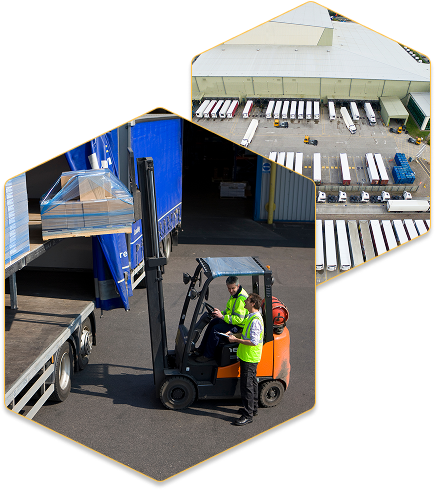
Freight moves with fewer handling steps
Crossdock and transload workflows reduce unnecessary putaway, storage, and extra touches.
Sort and staging stay structured
Inbound product can be immediately be staged by destination, customer, appointment, or outbound load inside the workflow.
Transload work stays visible
Receipt, breakdown, consolidation, re-palletization, and outbound prep stay visible inside the workflow.
Billing stays tied to the work performed
Crossdock and transload activity can be captured as billable warehouse handling.
What Powers Da Vinci’s Crossdock and Transload Workflows
Core capabilities built to improve crossdock and transload execution, reduce unnecessary handling, and support more complex freight movement inside the warehouse.
Native Crossdock Workflows
Route inbound freight directly into outbound handling based on configured workflow logic.
Configurable Routing Logic
Apply routing decisions based on customer requirements, product flow, destination, or shipment characteristics.
Directed Sort and Staging
Stage freight by destination, customer, appointment door, or outbound load requirement.
Crossdock and Transload Visibility
Track freight from receipt through sorting, staging, and outbound movement inside the WMS.
Transload and Consolidation Support
Support partial receipts, breakdown, re-palletization, consolidation, and outbound prep as part of warehouse execution.
Transaction-Level Billing Capture
Capture crossdock handling, transload services, and throughput-related activity as the work is performed.
Crossdock and Transload Workflows That Hold Up Under Volume
Take on more demanding crossdock and transload operations without building separate processes outside the WMS.
Support high-velocity freight without extra process layers
Crossdock and transload work can stay inside one WMS instead of shifting into manual side systems.
Reduce unnecessary storage touches
Move eligible freight through sort, staging, and outbound handling without forcing extra scans, putaway and retrieval steps.
Maintain visibility as complexity increases
Teams can keep track of freight, staging, and outbound prep in real-time as volumes and customer requirements grow.
Adapt workflows without vendor dependency
Your team can adjust routing logic, staging rules, and customer-specific handling requirements inside the platform.
Frequently Asked Questions (FAQs)
What is the difference between crossdock and transload?
Crossdock moves inbound freight straight to outbound with little or no time in storage. Transload adds handling in between, such as breaking freight down, re-palletizing, or consolidating it before it ships out. Da Vinci runs both inside the WMS instead of tracking them on spreadsheets or whiteboards.
Can a WMS send freight straight from receiving to outbound without putaway?
Yes. Da Vinci routes eligible freight from receiving directly into sorting, staging, and outbound handling, skipping unnecessary putaway and retrieval. Routing rules are configured by customer requirement, product flow, destination, or shipment characteristics, so the system decides what goes to storage and what moves through.
How does Da Vinci handle sorting and staging for crossdock freight?
Inbound product is staged by destination, customer, appointment door, or outbound load inside the workflow. Freight is tracked in real time from receipt through sorting, staging, and outbound movement, so your team can see what is moving through the building versus what is going to storage.
What transload work does Da Vinci support?
Da Vinci supports partial receipts, breakdown, re-palletization, consolidation, and outbound prep as part of warehouse execution. Each step stays visible in the workflow as freight is received, staged, and prepared for outbound, so transload work does not need separate manual tracking.
How are crossdock and transload charges captured for billing?
Crossdock handling, transload services, and throughput activity are captured as billable events as the work is performed. Charges are recorded alongside the work instead of being added later or missed, so invoices reflect the touches the freight actually received.
See How Da Vinci Handles Crossdock and Transload in Your Operation
Walk us through your current crossdock and transload workflow. We’ll show you how Da Vinci supports directed staging, transload execution, outbound prep, and billable activity capture inside one system.
- Review your current crossdock and transload workflow
- See how directed staging and routing are supported
- Understand how transload handling and billing capture work
- Get clarity on setup, scope, and operational fit